gclib 2.4.0
Galil Communications Library
Loading...
Searching...
No Matches
Examples

Controller Addresses

A core feature of gclib is the ability to connect to a controller over ethernet, serial, or PCI, using a single connection API.

  • C/C++ Use gclib_addresses() to see the different addresses that are available.
    • Code
      #include <gclib.h>
      #include <stdio.h>
      int main(int argc, char* argv[]) {
      char addresses[1024];
      gclib_addresses(addresses, sizeof(addresses));
      printf("Address, Model, Serial\n%s\n", addresses);
      }
      gclib_result gclib_addresses(char *addresses, size_t len)
      Show address, model, and serial of detected controllers, where available.
    • Output
      > .\addresses.exe
      Address, Model, Serial
      192.168.0.40, DMC4040 Rev 1.3i, 10601
      COM5, DMC-41x3
      GALILPCI0

    If using an ethernet controller that doesn't have an IP address yet, it will show up in gclib_ip_requests(). Use gclib_assign_ip() to give the controller an IP. If successful, the controller will begin showing up in gclib_addresses() under the new address.

    • Code
      #include <gclib.h>
      #include <stdio.h>
      int main(int argc, char* argv[]) {
      char result[1024];
      gclib_ip_requests(result, sizeof(result));
      printf("Address, Model, Serial\n%s\n", result);
      gclib_assign_ip("00:50:4C:20:29:69", "192.168.0.40");
      }
      gclib_result gclib_assign_ip(const char *mac, const char *ip)
      Assign IP to a controller.
      gclib_result gclib_ip_requests(char *ip_requests, size_t len)
      Show MAC address, model, and serial of all controllers requesting IP addresses, comma-separated.
    • Output
      > .\ip-requests.exe
      Address, Model, Serial
      00:50:4C:20:29:69, DMC4000, 10601
  • Python

    Use gclib.py.GAddresses() to see the different addresses that are available.
    >>> import gclib
    >>> gclib.py().GAddresses()
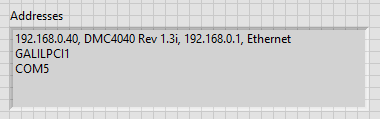
    {'192.168.0.40': ' DMC4040 Rev 1.3i', 'GALILPCI1': '', 'COM5': ''}

    If using an ethernet controller that doesn't have an IP address yet, it will show up in gclib.py.GIpRequests(). Use gclib.py.GAssign() to give the controller an IP. If successful, the controller will begin showing up in gclib.py.GAddresses() under the new address.

    >>> gclib.py().GIpRequests()
    {'DMC4000-10601': '00:50:4C:20:29:69'}
    >>> gclib.py().GAssign('192.168.0.40', '00:50:4C:20:29:69')
  • Java Use gclibjava.GclibJava.GAddresses() to see the different addresses that are available.

    • Code
      import gclibjava.*;
      public class Addresses {
      public static void main(String[] args) throws GclibJavaException {
      System.out.println(String.format(new GclibJava().GAddresses()));
      }
      }
      GCLIB_DEPRECATED GReturn GAddresses(GCStringOut addresses, GSize addresses_len)
      Uses GUtility(), G_UTIL_GCAPS_ADDRESSES or G_UTIL_ADDRESSES to provide a listing of all available con...
    • Output
      > java Addresses
      192.168.0.40, DMC4040 Rev 1.3i, 192.168.0.1, Ethernet
      GALILPCI1
      COM5

    If using an ethernet controller that doesn't have an IP address yet, it will show up in gclibjava.GclibJava.GIpRequests(). Use gclibjava.GclibJava.GAssign() to give the controller an IP. If successful, the controller will begin showing up in gclibjava.GclibJava.GAddresses() under the new address.

    • Code
      import gclibjava.*;
      public class IpRequests {
      public static void main(String[] args) throws GclibJavaException {
      GclibJava gclib = new GclibJava();
      System.out.println(gclib.GIpRequests());
      gclib.GAssign("192.168.0.40", "00:50:4C:20:29:69");
      }
      }
      Definition gclib.py:1
    • Output
      > java IpRequests
      DMC4000, 10601, 00:50:4C:20:29:69, Ethernet, 192.168.0.1, 0.0.0.0
  • C# Use gclib.GAddresses() to see the different addresses that are available.

    • Code
      string[] addresses = new gclib().GAddresses();
      System.Console.WriteLine(string.Join("\n", addresses));
    • Output
      > dotnet run --project Addresses
      192.168.0.40, DMC4040 Rev 1.3i, 192.168.0.1, Ethernet
      GALILPCI1
      COM5

    If using an ethernet controller that doesn't have an IP address yet, it will show up in gclib.GIpRequests(). Use gclib.GAssign() to give the controller an IP. If successful, the controller will begin showing up in gclib.GAddresses() under the new address.

    • Code
      gclib connection = new gclib();
      string[] ipRequests = connection.GIpRequests();
      System.Console.WriteLine(string.Join("\n", ipRequests));
      connection.GAssign("192.168.0.40", "00:50:4C:20:29:69");
      string[] GIpRequests()
      Provides a list of all Galil controllers requesting IP addresses via BOOT-P or DHCP.
      Definition gclib.cs:377
      void GAssign(string ip, string mac)
      Assigns IP address over the Ethernet to a controller at a given MAC address.
      Definition gclib.cs:206
    • Output
      > dotnet run --project IpRequests
      DMC4000, 10601, 00:50:4C:20:29:69, Ethernet, 192.168.0.1, 0.0.0.0
  • VB Use Gclib.GAddresses() to see the different addresses that are available.

    • Code
      Module Program
      Sub Main(args As string())
      System.Console.WriteLine(string.Join(Environment.NewLine, new Gclib().GAddresses()))
      End Sub
      End Module
    • Output
      > dotnet run --project Addresses
      192.168.0.40, DMC4040 Rev 1.3i, 192.168.0.1, Ethernet
      GALILPCI1
      COM5

    If using an ethernet controller that doesn't have an IP address yet, it will show up in Gclib.GIpRequests(). Use Gclib.GAssign() to give the controller an IP. If successful, the controller will begin showing up in Gclib.GAddresses() under the new address.

    • Code
      Module Program
      Sub Main(args As String())
      Dim Gclib As new Gclib()
      System.Console.WriteLine(string.Join(Environment.NewLine, Gclib.GIpRequests()))
      Gclib.GAssign("192.168.0.40", "00:50:4C:20:29:69")
      End Sub
      End Module
    • Output
      > dotnet run IpRequests
      DMC4000, 10601, 00:50:4C:20:29:69, Ethernet, 192.168.0.1, 0.0.0.0
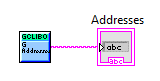
  • LabVIEW Use G Addresses to see the different addresses that are available.

    Addresses.vi
    • Front Panel  
    • Block Diagram  

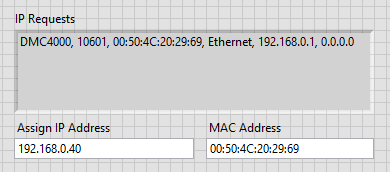
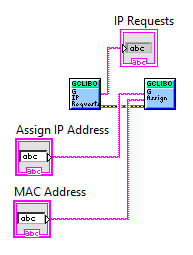
    If using an ethernet controller that doesn't have an IP address yet, it will show up in G Ip Requests. Use G Assign to give the controller an IP. If successful, the controller will begin showing up in G Addresses under the new address.

    IP Requests.vi
    • Front Panel  
    • Block Diagram  

Connection Management

  • C/C++ To use a controller with gclib, first pass the address to gclib_open() to receive a handle to the connection, which will be used in all gclib calls which operate on that connection. After you are done, close the connection with gclib_close().
    Note
    If you need to change the baud rate, call gclib_set_baud_rate() after gclib_open().
    • Code
      #include <gclib.h>
      #include <stdio.h>
      int main(int argc, char* argv[]) {
      gclib_handle h = 0;
      char address[32], revision[1024];
      uint32_t serial;
      gclib_open(&h, argv[1]);
      gclib_address(h, address, sizeof(address));
      gclib_revision_information(h, revision, sizeof(revision));
      gclib_serial_number(h, &serial);
      printf("Address: %s\nRevision: %s\nSerial: %i\n", address, revision, serial);
      }
      gclib_result gclib_close(gclib_handle *h)
      Close connection to controller.
      gclib_result gclib_address(gclib_handle h, char *address, size_t len)
      Get connection address.
      gclib_result gclib_open(gclib_handle *h, const char *address)
      Open a connection to a controller.
      gclib_result gclib_serial_number(gclib_handle h, uint32_t *serial_number)
      Get serial number from controller.
      gclib_result gclib_revision_information(gclib_handle h, char *rev_info, size_t len)
      Get revision information (^R^V) from controller.
      struct Context * gclib_handle
      A handle to an open connection given by gclib_open() for use in future API calls.
      Definition gclib.h:23
    • Output
      > .\connection.exe 192.168.0.40
      Address: 192.168.0.40
      Revision: DMC4040 Rev 1.3i
      Serial: 10601
      
    Attention
    If the program exits before calling gclib_close(), the controller may be left in an inconsistent state.
  • Python To use a controller with gclib, first create a gclib.py() object, then pass an address to gclib.py.GOpen().
    >>> connection = gclib.py()
    >>> connection.GOpen('192.168.0.40')
    Now we can use gclib.py.GInfo() to show basic info about the open connection.
    >>> connection.GInfo()
    192.168.0.40, DMC4040 Rev 1.3i, 10601
    After you are done with the connection, close it with gclib.py.GClose().
    >>> connection.GClose()
    Attention
    If the program exits before calling gclib.py.GClose(), the controller may be left in an inconsistent state.
  • Java To use a controller with gclib, first create a gclibjava.GclibJava() object, then pass an address to gclibjava.GclibJava.GOpen(). After you are done, close the connection with gclibjava.GclibJava.GClose().

    • Code
      import gclibjava.*;
      public class Connection {
      public static void main(String[] args) throws GclibJavaException {
      GclibJava connection = new GclibJava();
      connection.GOpen(args[0]);
      System.out.println(connection.GInfo());
      connection.GClose();
      }
      }
    • Output
      > java Connection 192.168.0.40
      192.168.0.40, DMC4040 Rev 1.3i, 10601
      
    Attention
    If the program exits before calling GClose(), the controller may be left in an inconsistent state.
  • C# To use a controller with gclib, first create a gclib() object, then pass an address to gclib.GOpen(). After you are done, close the connection with gclib.GClose().

    • Code
      gclib connection = new gclib();
      connection.GOpen(args[0]);
      System.Console.WriteLine(connection.GInfo());
      connection.GClose();
      string GInfo()
      Provides a useful connection string.
      Definition gclib.cs:333
      void GClose()
      Used to close a connection to Galil hardware.
      Definition gclib.cs:222
      void GOpen(string address)
      Used to open a connection to Galil hardware.
      Definition gclib.cs:439
    • Output
      > dotnet run --project Connection 192.168.0.40
      192.168.0.40, DMC4040 Rev 1.3i, 10601
    Attention
    If the program exits before calling gclib.GClose(), the controller may be left in an inconsistent state.
  • VB To use a controller with gclib, first create a Gclib() object, then pass an address to Gclib.GOpen(). After you are done, close the connection with Gclib.GClose().

    • Code
      Module Program
      Sub Main(args As String())
      Dim connection As new Gclib()
      connection.GOpen(args(0))
      System.Console.WriteLine(connection.GInfo())
      connection.GClose()
      End Sub
      End Module
    • Output
      > dotnet run --project Connection 192.168.0.40
      192.168.0.40, DMC4040 Rev 1.3i, 10601
    Attention
    If the program exits before calling Gclib.GClose(), the controller may be left in an inconsistent state.
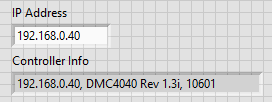
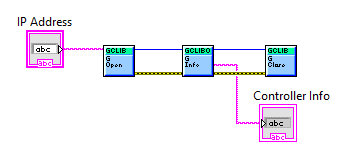
  • LabVIEW To use a controller with gclib, first pass the address to G Open to receive a handle to the connection. This handle will be used in future library calls such as G Info, which we use to display some information about the open connection. After you are done, close the connection with G Close.

    Connection.vi
    • Front Panel
    • Block Diagram
    Attention
    If the program exits before calling G Close, the controller may be left in an inconsistent state.

Commands

  • C/C++ To issue commands, use gclib_command() with an open connection. The following example uses gclib_command() to implement a basic terminal.

    • Code
      #include <gclibo.h>
      #include <stdio.h>
      int main(int argc, char* argv[]) {
      gclib_handle h = NULL;
      char command[80];
      char response[1024];
      gclib_open(&h, argv[1]);
      gclib_revision_information(h, response, sizeof(response));
      printf("Connected to %s. Press %s to exit.\n:", response,
      #ifdef WIN32
      "Ctrl+Z then Enter"
      #else
      "Ctrl+D"
      #endif
      );
      while (fgets(command, sizeof(command), stdin)) {
      gclib_command(h, command, response, sizeof(response));
      printf("%s%s:", response, strlen(response) ? "\n" : "");
      }
      printf("\n");
      return 0;
      }
      gclib_result gclib_command(gclib_handle h, const char *command, char *buf, size_t len)
      Issues a command to the controller and provides the response.
    • Output
      > .\commands.exe 192.168.0.40
      Connected to DMC4040 Rev 1.3i. Press Ctrl+Z then Enter to exit.
      :MG "Hello World"
      Hello World
      :^Z
  • Python To issue commands, use gclib.py.GCommand() with an open connection.
    >>> connection.GOpen('192.168.0.40')
    >>> connection.GCommand('Hello World')
    'Hello World'
  • Java To issue commands, use gclibjava.GclibJava.GCommand() with an open connection. The following example uses gclibjava.GclibJava.GCommand() to implement a basic terminal.

    • Code
      import gclibjava.*;
      import java.util.NoSuchElementException;
      import java.util.Scanner;
      public class Commands {
      public static void main(String[] args) throws GclibJavaException {
      GclibJava connection = new GclibJava();
      connection.GOpen(args[0]);
      System.out.println(connection.GInfo());
      System.out.print(":");
      Scanner scanner = new Scanner(System.in);
      try {
      while (true) {
      String result = connection.GCommand(scanner.nextLine());
      System.out.print(result.equals(":") ? result : result + "\r\n:");
      }
      } catch (NoSuchElementException e) {}
      scanner.close();
      connection.GClose();
      }
      }
    • Output
      > java Commands 192.168.0.40
      Connected to 192.168.0.40, DMC4040 Rev 1.3i, 10601
      Use Ctrl+C to exit.
      :MG "Hello World"
      Hello World
      :^C
  • C# To issue commands, use gclib.GCommand() with an open connection. The following example uses gclib.GCommand() to implement a basic terminal.

    • Code
      gclib connection = new gclib();
      connection.GOpen(args[0]);
      System.Console.WriteLine(connection.GInfo());
      System.Console.Write(':');
      while (true) {
      string result = connection.GCommand(System.Console.ReadLine());
      System.Console.Write(result.Length == 0 ? ":" : result + "\r\n:");
      }
      connection.GClose();
      string GCommand(string Command, bool Trim=true)
      Used for command-and-response transactions.
      Definition gclib.cs:241
    • Output
      > dotnet run --project Commands 192.168.0.40
      Connected to 192.168.0.40, DMC4040 Rev 1.3i, 10601
      Use Ctrl+C to exit.
      :MG "Hello World"
      Hello World
      :^C
  • VB To issue commands, use Gclib.GCommand() with an open connection. The following example uses Gclib.GCommand() to implement a basic terminal.

    • Code
      Module Program
      Sub Main(args As String())
      Dim connection As new Gclib()
      connection.GOpen(args(0))
      System.Console.WriteLine(connection.GInfo())
      System.Console.Write(":")
      While (true)
      Dim result As String = connection.GCommand(System.Console.ReadLine())
      System.Console.Write(If(result.Length = 0, ":", result + Environment.NewLine + ":"))
      End While
      connection.GClose()
      End Sub
      End Module
    • Output
      > dotnet run --project Commands 192.168.0.40
      Connected to 192.168.0.40, DMC4040 Rev 1.3i, 10601
      Use Ctrl+C to exit.
      :MG "Hello World"
      Hello World
      :^C
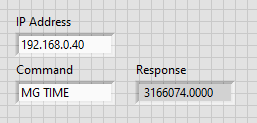
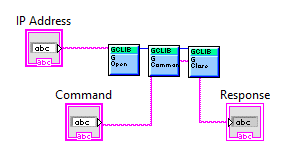
  • LabVIEW To issue commands, use G Command with an open connection.

    Commands.vi
    • Front Panel
    • Block Diagram

Errors

  • C/C++ All gclib functions provide a gclib_result value to indicate the error, with zero (GCLIB_SUCCESS) indicating success. Use gclib_error() to get a string description of the error.

  • Python If a gclib call is unsuccessful, a gclib.GclibError will be thrown with a description of the error.
    >>> connection.GCommand('invalid')
    Traceback (most recent call last):
    ...
    gclib.GclibError: question mark returned by controller
  • Java If a gclib call is unsuccessful, a gclibjava.GclibJavaException() will be thrown with the error code and description.
    • Code
      import gclibjava.*;
      public class Errors {
      public static void main(String[] args) throws GclibJavaException {
      GclibJava connection = new GclibJava();
      connection.GOpen(args[0]);
      try {
      connection.GCommand("invalid");
      } catch (GclibJavaException e) {
      System.out.println(String.format("Command 'invalid' returned %d: %s", e.getErrorCode(), e.getMessage()));
      }
      connection.GClose();
      }
      }
    • Output
      > java Errors 192.168.0.40
      Command "invalid" returned -10000: "question mark returned by controller"
  • C# If a gclib call is unsuccessful, an exception will be thrown with the error code and description.
    • Code
      gclib connection = new gclib();
      connection.GOpen(args[0]);
      try {
      System.Console.WriteLine(connection.GCommand("invalid"));
      } catch (System.Exception e) {
      System.Console.WriteLine("Command 'invalid' returned " + e.Message);
      }
      connection.GClose();
    • Output
      > dotnet run --project Errors 192.168.0.40
      Command "invalid" returned -10000: "question mark returned by controller"
  • VB If a gclib call is unsuccessful, an exception will be thrown with the error code and description.
    • Code
      Module Program
      Sub Main(args As String())
      Dim connection As new Gclib()
      connection.GOpen(args(0))
      Try
      connection.GCommand("invalid")
      Catch e As System.Exception
      System.Console.WriteLine("Command 'invalid' returned " + e.Message)
      End Try
      connection.GClose()
      End Sub
      End Module
    • Output
      > dotnet run --project Errors 192.168.0.40
      Command "invalid" returned -10000: "question mark returned by controller"
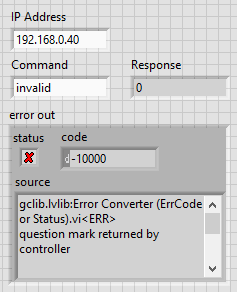
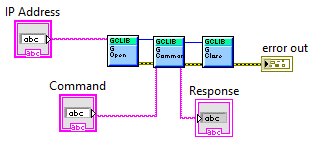
  • LabVIEW Standard error chaining is supported by gclib. See gclib_errors.h for a full list of error codes.
    Errors.vi
    • Front Panel
    • Block Diagram

Program & Arrays

  • C/C++ Use gclib_program() to get the controller's program, and use gclib_set_program() to set it.

    • Code
      #include <gclib.h>
      #include <stdio.h>
      int main(int argc, char* argv[]) {
      char program[1024];
      gclib_open(&h, argv[1]);
      "#AUTO\n"
      "MG \"Hello World\"\n"
      "EN", NULL);
      gclib_program(h, program, sizeof(program));
      printf("%s\n", program);
      }
      gclib_result gclib_set_program(gclib_handle h, const char *program, const char *insert)
      Set the program on the controller.
      gclib_result gclib_program(gclib_handle h, char *program, size_t len)
      Get the controller's current program.
    • Output
      > .\program.exe 192.168.0.40
      MG "Hello World"

    Use gclib_array() to get an array from the controller, and use gclib_set_array() to set it. Use the start and end arguments to transfer only a subset of the array.

    • Code
      #include <gclib.h>
      #include <stdio.h>
      int main(int argc, char* argv[]) {
      char array[128];
      gclib_open(&h, argv[1]);
      gclib_command(h, "DM test[5]", NULL, 0);
      gclib_set_array(h, "test", "1,2,3,4,5", 0, 4);
      gclib_array(h, "test", array, sizeof(array), 1, 3);
      printf("%s\n", array);
      gclib_command(h, "DA test[5]", NULL, 0);
      }
      gclib_result gclib_set_array(gclib_handle h, const char *name, const char *buf, size_t start, size_t end)
      Set an array on the controller.
      gclib_result gclib_array(gclib_handle h, const char *name, char *buf, size_t len, size_t start, size_t end)
      Get an array from the controller.
    • Output
      > .\arrays.exe 192.168.0.40
      2.0000, 3.0000, 4.0000
  • Python Use gclib.py.GProgramUpload() to get the controller's program, and use gclib.py.GProgramDownload() to set it.

    >>> connection.GProgramDownload('MG "Hello World"')
    >>> connection.GProgramUpload()
    'MG "Hello World"'

    Use gclib.py.GArrayUpload() and gclib.py.GArrayDownload() similarly for arrays. Use the first and last arguments to transfer only part of the array.

    >>> connection.GCommand('DM test[5]')
    >>> connection.GArrayDownload('test', 0, 4, [1, 2, 3, 4, 5])
    >>> connection.GArrayUpload('test', 1, 3)
    [2.0, 3.0, 4.0]
  • Java Use gclibjava.GclibJava.GProgramUpload() to get the controller's program, and use gclibjava.GclibJava.GProgramDownload() to set it. See the gclib Program Preprocessor for advanced usage.

    • Code
      import gclibjava.*;
      public class Program {
      public static void main(String[] args) throws GclibJavaException {
      GclibJava connection = new GclibJava();
      connection.GOpen(args[0]);
      connection.GProgramDownload("MG \"Hello World\"");
      System.out.println(connection.GProgramUpload());
      connection.GClose();
      }
      }
    • Output
      > java Program 192.168.0.40
      MG "Hello World"

    Use gclibjava.GclibJava.GArrayUpload() to get an array from the controller, and use gclibjava.GclibJava.GArrayDownload() to set it.

    • Code
      import gclibjava.*;
      public class Arrays {
      public static void main(String[] args) throws GclibJavaException {
      GclibJava connection = new GclibJava();
      connection.GOpen(args[0]);
      connection.GCommand("DM test[5]");
      connection.GArrayDownload("test", java.util.Arrays.asList(1.0, 2.0, 3.0, 4.0, 5.0));
      System.out.println(connection.GArrayUpload("test"));
      connection.GClose();
      }
      }
    • Output
      > java Arrays 192.168.0.40
      2.0000, 3.0000, 4.0000
  • C# Use gclib.GProgramUpload() to get the controller's program, and use gclib.GProgramDownload() to set it. See the gclib Program Preprocessor for advanced usage.

    Use gclib.GArrayUpload() to get an array from the controller, and use gclib.GArrayDownload() to set it.

    • Code
      gclib connection = new gclib();
      connection.GOpen(args[0]);
      connection.GCommand("DM test[5]");
      List<double> test = new List<double>{1, 2, 3, 4, 5};
      connection.GArrayDownload("test", ref test);
      System.Console.WriteLine(string.Join(", ", connection.GArrayUpload("test")));
      connection.GClose();
      void GArrayDownload(string array_name, ref List< double > data, Int16 first=-1, Int16 last=-1)
      Downloads array data to a pre-dimensioned array in the controller's array table.
      Definition gclib.cs:104
      List< double > GArrayUpload(string array_name, Int16 first=-1, Int16 last=-1)
      Uploads array data from the controller's array table.
      Definition gclib.cs:153
    • Output
      > dotnet run --project Arrays 192.168.0.40
      2.0000, 3.0000, 4.0000
  • VB Use Gclib.GProgramUpload() to get the controller's program, and use Gclib.GProgramDownload() to set it. See the gclib Program Preprocessor for advanced usage.

    • Code
      Module Program
      Sub Main(args As String())
      Dim connection As Gclib = new Gclib()
      connection.GOpen(args(0))
      connection.GCommand("DM test[5]")
      connection.GProgramDownload("MG ""Hello World""")
      System.Console.WriteLine(connection.GProgramUpload())
      connection.GClose()
      End Sub
      End Module
    • Output
      > dotnet run --project Program 192.168.0.40
      MG "Hello World"

    Use Gclib.GArrayUpload() to get an array from the controller, and use Gclib.GArrayDownload() to set it.

    • Code
      Module Program
      Sub Main(args As String())
      Dim connection As Gclib = new Gclib()
      connection.GOpen(args(0))
      connection.GCommand("DM test[5]")
      connection.GArrayDownload("test", new List(Of Double)({1, 2, 3, 4, 5}))
      System.Console.WriteLine(string.Join(", ", connection.GArrayUpload("test")))
      connection.GClose()
      End Sub
      End Module
    • Output
      > dotnet run --project Arrays 192.168.0.40
      2.0000, 3.0000, 4.0000
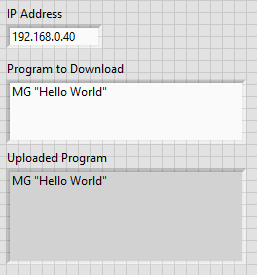
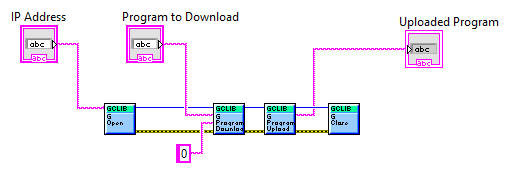
  • LabVIEW Use G Program Upload to get the controller's program, and use G Program Download to set it. See the gclib Program Preprocessor for advanced usage.

    Program.vi
    • Front Panel
    • Block Diagram

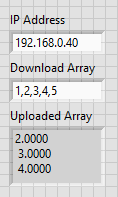
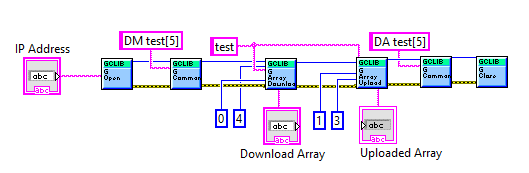
    Use G Array Upload to get an array from the controller, and use G Array Download to set it.

    • Use the first and last inputs to transfer only part of the array.
    Arrays.vi
    • Front Panel
    • Block Diagram

Unsolicited Data

  • C/C++ The unsolicited data API can be used in blocking mode or callback mode.

    Blocking mode is simpler to use, but has tradeoffs. If you want unsolicited data as soon as it arrives, you must block the thread to wait for it, which may not be ideal. If you want to keep the thread running, then you must periodically check for queued unsolicited data, which can add unwanted latency.

    Callback mode allows your thread to stay running while enabling immediate response to unsolicited data. When data arrives, your callback function will be invoked on a separate, dedicated thread. Due to this, callback mode can be more complicated to use if you are not familiar with thread synchronization.

    For a full list of data record fields, see the Data Record API.

    Note
    Controllers with default settings will not generate interrupts or data records. Use gclib_set_interrupts() and gclib_set_data_records() to configure your controller if needed.
  • Python

    >>> connection.GClose()
    >>> connection.GOpen('192.168.0.40 --subscribe ALL')

    Use gclib.py.GMessage() to get unsolicited messages from the controller, and gclib.py.GInterrupt() to get event interrupts. If there is no data available, these methods will block up to five seconds before timing out.

    >>> connection.GProgramDownload('MG "Hello World"; UI0; EN')
    >>> connection.GCommand('XQ')
    ''
    >>> connection.GMessage()
    'Hello World\r\n'
    >>> connection.GInterrupt()
    240
  • Java Use gclibjava.GclibJava.GMessage() to get unsolicited messages from the controller, gclibjava.GclibJava.GInterrupt() to get event interrupts, and gclibjava.GclibJava.GRecord() to get data records. If there is no data available, these methods will block up to five seconds before timing out.

    • Code
      import gclibjava.*;
      public class Unsolicited {
      public static void main(String[] args) throws GclibJavaException {
      GclibJava connection = new GclibJava();
      connection.GOpen(args[0]);
      connection.GProgramDownload("MG \"Hello World\"; UI0; EN");
      connection.GCommand("XQ");
      System.out.println("Got message " + connection.GMessage());
      System.out.println("Got interrupt " + connection.GInterrupt());
      connection.GClose();
      }
      }
    • Output
      > java Unsolicited "192.168.0.40 --subscribe ALL"
      Got message Hello World
      Got data record 39306
      Got interrupt 240
  • C# Use gclib.GMessage() to get unsolicited messages from the controller, gclib.GInterrupt() to get event interrupts, and gclib.GRecord() to get data records. If there is no data available, these methods will block up to five seconds before timing out.

    • Code
      using Galil;
      Gclib connection = new Gclib();
      connection.GOpen(args[0] + " --subscribe ALL");
      connection.GProgramDownload("MG \"Hello World\"; UI0; EN");
      connection.GCommand("XQ");
      System.Console.Write("Got message " + connection.GMessage());
      System.Console.WriteLine("Got interrupt " + connection.GInterrupt());
      connection.GCommand("DR8");
      System.Console.WriteLine("Got data record " + connection.GRecord<Gclib.GDataRecord4000>(true).sample_number);
      connection.GCommand("DR0");
      connection.GClose();
    • Output
      > dotnet run --project Unsolicited 192.168.0.40
      Got message Hello World
      Got data record 39306
      Got interrupt 240
  • VB Use Gclib.GMessage() to get unsolicited messages from the controller, Gclib.GInterrupt() to get event interrupts, and Gclib.GRecord() to get data records. If there is no data available, these methods will block up to five seconds before timing out.

    • Code
      Module Program
      Sub Main(args As String())
      Dim connection As new Gclib()
      connection.GOpen(args(0) + " --subscribe ALL")
      connection.GProgramDownload("MG ""Hello World""; UI0; EN")
      connection.GCommand("XQ")
      System.Console.Write("Got message " + connection.GMessage())
      System.Console.WriteLine("Got interrupt {0}", connection.GInterrupt().ToString())
      connection.GCommand("DR8")
      System.Console.WriteLine("Got data record {0}", connection.GRecord(Of Gclib.GDataRecord4000)(true).sample_number)
      connection.GCommand("DR0")
      connection.GClose()
      End Sub
      End Module
    • Output
      > dotnet run --project Unsolicited 192.168.0.40
      Got message Hello World
      Got data record 39306
      Got interrupt 240
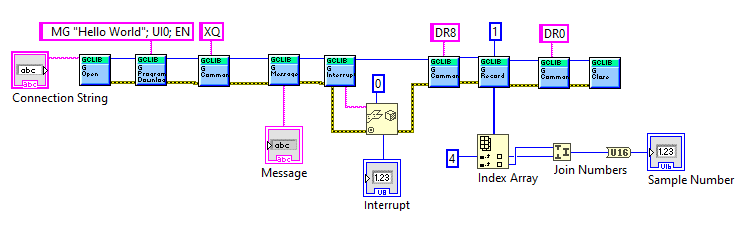
  • LabVIEW Use G Message to get unsolicited messages from the controller, G Interrupt to get event interrupts, and G Record to get data records. If there is no data available, these methods will block up to five seconds before timing out.

    For G Record, note that memory must be allocated using the 'Initialize Array' node to store the data record packet. This memory space is filled with the information in the data record packet and then parsed using the 'Index Array' and 'Join Numbers' nodes.

    Unsolicited.vi
    • Front Panel
    • Block Diagram

Galil Connect

Galil Connect allows gclib to issue commands through a remote gcaps server. This makes debugging closed or distant systems much easier.

  • C/C++ On the device hosting the remote gcaps server, use gclib_set_published().

    • Code
      #include <gclib.h>
      #include <stdio.h>
      #include <stdbool.h>
      int main(int argc, char* argv[]) {
      printf("Published remote gcaps server \"%s\"\n", argv[1]);
      }
      gclib_result gclib_set_published(const char *name)
      Set published status of local gcaps server.
    • Output
      > .\server.exe pi
      Published remote gcaps server "pi"

    On the client, use gclib_list_servers() to view all available gcaps servers. Pass a server name to gclib_set_server() for future gclib calls to be routed through that gcaps server. When done, pass NULL to gclib_set_server() to disconnect from the remote gcaps server.
  • Python

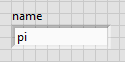
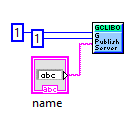
    On the device hosting the remote gcaps server (in this example a Raspberry Pi), use gclib.py.GPublishServer().

    >>> connection.GPublishServer('pi', True, True)

    On the client, use gclib.py.GListServers() to view all available gcaps servers. Pass a server name to gclib.py.GSetServer() for future gclib calls to be routed through that gcaps server. When done, pass the special string "Local" to gclib.py.GSetServer() to disconnect from the remote gcaps server.
    >>> connection.GListServers()
    'pi'
    >>> connection.GSetServer('pi')
    >>> connection.GAddresses()
    {'COM5': ''}
    >>> connection.GOpen("COM5")
    >>> connection.GInfo()
    'COM5, DMC31010 Rev 1.4f, 12345'
    >>> connection.GClose()
    >>> connection.GSetServer('Local')
  • Java On the device hosting the remote gcaps server (in this example a Raspberry Pi), use gclibjava.GclibJava.GPublishServer().

    • Code
      import gclibjava.*;
      public class Server {
      public static void main(String[] args) throws GclibJavaException {
      new GclibJava().GPublishServer(args[0], 1, 1);
      System.out.println("Published remote gcaps server " + args[0]);
      }
      }
    • Output
      > java Server pi
      Published gcaps server "pi"

    On the client, use gclibjava.GclibJava.GListServers() to view all available gcaps servers. Pass a server name to gclibjava.GclibJava.GSetServer() for future gclib calls to be routed through that gcaps server. When done, pass the special string "Local" to gclibjava.GclibJava.GSetServer() to disconnect from the remote gcaps server.

    • Code
      import gclibjava.*;
      public class Client {
      public static void main(String[] args) throws GclibJavaException {
      GclibJava connection = new GclibJava();
      System.out.println(connection.GListServers());
      connection.GSetServer(args[0]);
      System.out.println("Addresses reported by pi: " + connection.GAddresses());
      connection.GOpen(args[1]);
      System.out.println(connection.GInfo());
      connection.GClose();
      connection.GSetServer("Local");
      }
      }
    • Output
      > java Client pi COM5
      Available servers:
      pi
      Addresses reported by pi:
      COM5
      Connected to COM5, DMC31010 Rev 1.4f, 12345
  • C# On the device hosting the remote gcaps server (in this example a Raspberry Pi), use gclib.GPublishServer().

    • Code
      gclib connection = new gclib();
      connection.GPublishServer(args[0], true, true);
      System.Console.WriteLine("Published remote gcaps server " + args[0]);
      void GPublishServer(string server_name, bool publish, bool save)
      Publishes or removes local gcaps server from the network.
      Definition gclib.cs:745
    • Output
      > dotnet run --project Server pi
      Published gcaps server "pi"

    On the client, use gclib.GListServers() to view all available gcaps servers. Pass a server name to gclib.GSetServer() for future gclib calls to be routed through that gcaps server.

    • Code
      gclib connection = new gclib();
      System.Console.WriteLine("Available servers:" + Environment.NewLine + string.Join(Environment.NewLine, connection.GListServers()));
      connection.GSetServer(args[0]);
      System.Console.WriteLine(Environment.NewLine + "Addresses reported by pi: " + Environment.NewLine + string.Join(Environment.NewLine, connection.GAddresses()));
      connection.GOpen(args[1]);
      System.Console.WriteLine(Environment.NewLine + "Connected to " + connection.GInfo());
      connection.GSetServer("Local");
      string[] GAddresses()
      Return a string array of available connection addresses.
      Definition gclib.cs:79
      void GSetServer(string server_name)
      Connects gclib to a new gcaps server.
      Definition gclib.cs:690
      string[] GListServers()
      Retrieves a list of gcaps servers that are advertising themselves on the local network.
      Definition gclib.cs:722
    • Output
      > dotnet run --project Client pi COM5
      Available servers:
      pi
      Addresses reported by pi:
      COM5
      Connected to COM5, DMC31010 Rev 1.4f, 12345
  • VB On the device hosting the remote gcaps server (in this example a Raspberry Pi), use Gclib.GPublishServer().

    • Code
      Module Program
      Sub Main(args As String())
      Dim connection As new Gclib()
      connection.GPublishServer(args(0), true, true)
      System.Console.WriteLine("Published remote gcaps server " + args(0))
      End Sub
      End Module
    • Output
      > dotnet run --project Server pi
      Published gcaps server "pi"

    On the client, use Gclib.GListServers() to view all available gcaps servers. Pass a server name to Gclib.GSetServer() for future gclib calls to be routed through that gcaps server.

    • Code
      Module Program
      Sub Main(args As String())
      Dim connection As new Gclib()
      System.Console.WriteLine("Available servers: " + Environment.NewLine + String.Join(Environment.NewLine, connection.GListServers()))
      connection.GSetServer(args(0))
      System.Console.WriteLine(Environment.NewLine + "Addresses reported by pi: " + Environment.NewLine + String.Join(Environment.NewLine, connection.GAddresses()))
      connection.GOpen(args(1))
      System.Console.WriteLine(Environment.NewLine + "Connected to " + connection.GInfo())
      connection.GSetServer("Local")
      End Sub
      End Module
    • Output
      > dotnet run --project Client pi COM5
      Available servers:
      pi
      Addresses reported by pi:
      COM5
      Connected to COM5, DMC31010 Rev 1.4f, 12345
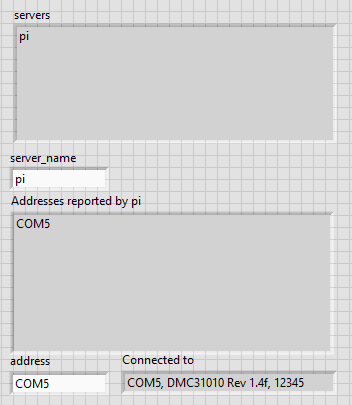
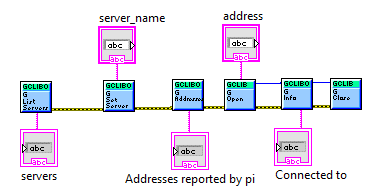
  • LabVIEW On the device hosting the remote gcaps server (in this example a Raspberry Pi), use G Publish Server.

    Server.vi
    • Front Panel
    • Block Diagram

    On the client, use G List Servers to view all available gcaps servers. Pass a server name to G Set Server for future gclib calls to be routed through that gcaps server. When done, pass the special string "Local" to G Set Server to disconnect from the remote gcaps server.

    Client.vi
    • Front Panel
    • Block Diagram

Example Project: Record and Replay

This project contains two example programs.

  • C/C++ The 'Record' example uses RA in continuous mode along with GArrayUpload() to allow recording movement for an arbitrary amount of time. It produces a file with the recorded positions of all axes.

    • Code
      #include <gclib.h>
      #include <stdio.h>
      #include <stdlib.h>
      #include <string.h>
      #include <time.h>
      #include "sleep.h"
      void check(gclib_result ret, gclib_handle h) {
      char error[128];
      if (ret == GCLIB_SUCCESS) {
      return;
      } else if (ret == GCLIB_COMMAND_ERROR) {
      gclib_command(h, "TC1", error, sizeof(error));
      printf("%s\n", error);
      }
      fprintf(stderr, "Error %i: %s\n", ret, gclib_error(h));
      exit(ret);
      }
      int main(int argc, char* argv[]) {
      if (argc != 3) {
      fprintf(stderr, "Usage: record.exe ADDRESS SECONDS\n");
      return 1;
      }
      char* buf = (char*)malloc(16384);
      union GDataRecord record;
      size_t bytesReturned;
      gclib_handle h = NULL;
      if (gclib_open(&h, argv[1]) != GCLIB_SUCCESS) {
      fprintf(stderr, "Failed to open connection to controller");
      exit(1);
      }
      char arrayName[5];
      sprintf(arrayName, "posA");
      gclib_command(h, "MO", NULL, 0);
      gclib_command(h, "DM posA[1000]", NULL, 0);
      gclib_command(h, "RA posA[]", NULL, 0);
      gclib_command(h, "RD _TPA", NULL, 0);
      gclib_command(h, "RC 1,-1000", NULL, 0);
      size_t start = 0, end;
      char* positions = (char*)malloc(16384);
      char* token;
      int count;
      time_t startTime = time(NULL);
      FILE* file = fopen("positions.txt", "w");
      while (difftime(time(NULL), startTime) < atof(argv[2])) {
      msleep(500);
      gclib_command(h, "MG_RD", buf, 16384);
      end = atoi(buf);
      check(gclib_array(h, arrayName, positions, 16384, start, end < start ? 0 : end), h);
      printf("%zu\n", strlen(positions));
      if (end < start) {
      check(gclib_array(h, arrayName, buf, 16384, 0, end), h);
      printf("%zu\n", strlen(buf));
      strcat(positions, ", ");
      strcat(positions, buf);
      }
      count = end - start;
      if (end < start)
      count += 1000;
      for (int i = 0; i < count; i++) {
      token = strtok( i == 0 ? positions : NULL, " ,");
      if (token == NULL)
      break;
      fprintf(file, "%s", token);
      fputc('\n', file);
      }
      start = end;
      }
      fclose(file);
      gclib_command(h, "RC 0", NULL, 0);
      }
      @ GCLIB_SUCCESS
      Definition gclib.h:30
      Data record union, containing all structs and a generic byte array accessor.
    • Output
      > .\record.exe 192.168.0.40 5

    The 'Replay' example uses the file produced by 'Record' along with CM to accurately reproduce the recorded movement. Note that all axes must be properly set up for motion.

    • Code
      #include <gclib.h>
      #include <stdio.h>
      #include <stdlib.h>
      #include "sleep.h"
      void check(gclib_result ret, gclib_handle h) {
      char error[128];
      if (ret == GCLIB_SUCCESS)
      return;
      if (ret == GCLIB_COMMAND_ERROR) {
      gclib_command(h, "TC1", error, sizeof(error));
      printf("%s\n", error);
      }
      fprintf(stderr, "Error %i: %s\n", ret, gclib_error(h));
      exit(ret);
      }
      int main(int argc, char* argv[]) {
      if (argc != 2) {
      fprintf(stderr, "Usage: replay.exe ADDRESS\n");
      return 0;
      }
      char* buf = (char*)malloc(16384);
      GCon h = NULL;
      if (gclib_open(&h, argv[1]) != GCLIB_SUCCESS) {
      fprintf(stderr, "Failed to open connection to controller");
      exit(1);
      }
      gclib_command(h, "MG_CM", NULL, 0);
      int contourSpace = atof(buf);
      gclib_command(h, "SH A", NULL, 0);
      gclib_command(h, "CM A", NULL, 0);
      gclib_command(h, "DT -1", NULL, 0);
      FILE* f = fopen("positions.txt", "r");
      if (f == NULL) {
      fprintf(stderr, "Failed to open positions.txt");
      return 1;
      }
      int lastPosition;
      int position;
      fgets(buf, 16384, f);
      lastPosition = atof(buf);
      while (fgets(buf, 16384, f)) {
      position = atof(buf);
      sprintf(buf, "CD %i", position - lastPosition);
      lastPosition = position;
      if (gclib_command(h, buf, NULL, 0) == GCLIB_COMMAND_ERROR) {
      check(gclib_command(h, "MG_TC", buf, 16384), h);
      if ((int)atof(buf) == 32) {
      gclib_command(h, "MG_DT", buf, 16384);
      if ((int)atof(buf) == -1)
      gclib_command(h, "DT 1", NULL, 0);
      msleep(100);
      }
      }
      }
      do {
      gclib_command(h, "MG_CM", buf, 0);
      } while ((int)atof(buf) < contourSpace);
      fclose(f);
      gclib_command(h, "CD 0=0", NULL, 0);
      gclib_command(h, "MO", NULL, 0);
      }
      struct Context * GCon
      Connection handle. Unique for each connection in process. Assigned a non-zero value in GOpen().
    • Output
      > .\replay.exe 192.168.0.40
  • Python The 'Record' example uses RA in continuous mode along with gclib.py.GProgramUpload() to allow recording movement for an arbitrary amount of time. It produces a file with the recorded positions of all axes.

    • Code
      import gclib
      import sys
      import time
      def main():
      if (len(sys.argv) != 3):
      print(f"Usage: record.py ADDRESS SECONDS", file=sys.stderr)
      return
      connection = gclib.py()
      try:
      connection.GOpen(sys.argv[1])
      connection.GCommand('MO')
      connection.GCommand('DM posA[1000]')
      connection.GCommand('RA posA[]')
      connection.GCommand('RD _TPA')
      connection.GCommand('RC 1,-1000') # Assuming TM1000, record at 2ms intervals (1ms on DMC30010 / EDD37010 / RIO47000)
      start = 0
      end = -1
      positions = None
      startTime = time.time()
      f = open("positions.txt", "w")
      while (time.time() - startTime < float(sys.argv[2])):
      time.sleep(0.5); # Assumes TM1000
      end = int(float(connection.GCommand("MG_RD")))
      positions = connection.GArrayUpload('posA', start, -1 if end < start else end)
      if end < start:
      positions += connection.GArrayUpload('posA', 0, end)
      for i in range(end - start if end > start else 1000 - start + end):
      f.write(str(positions[i]) + '\n')
      start = end
      f.close()
      except gclib.GclibError as e:
      print(e)
      connection.GCommand("RC 0")
      connection.GClose()
      if __name__ == '__main__':
      main()
      Error class for non-zero gclib return codes.
      Definition gclib.py:146
      Represents a single Python connection to a Galil Controller or PLC.
      Definition gclib.py:152
    • Output
      > python record.py 192.168.0.40 5

    The 'Replay' example uses the file produced by 'Record' along with CM to accurately reproduce the recorded movement. Note that all axes must be properly set up for motion.

    • Code
      import gclib
      import sys
      import time
      def main():
      if len(sys.argv) != 2:
      print(f'Usage: replay.py ADDRESS', file=sys.stderr)
      return 1
      connection = gclib.py()
      try:
      connection.GOpen(sys.argv[1])
      connection.GCommand('SH A')
      connection.GCommand('CM A')
      connection.GCommand('DT -1')
      contourSpace = int(float(connection.GCommand('MG_CM')))
      f = open("positions.txt", "r")
      lastPosition = None
      for line in f.read().splitlines():
      position = int(float(line))
      if lastPosition:
      movement = position - lastPosition
      try:
      connection.GCommand(f'CD {str(movement)}')
      if (connection.GCommand('TC1') != '32 Segment buffer full'):
      raise
      if (int(float(connection.GCommand('MG_DT'))) == -1):
      connection.GCommand('DT 1')
      time.sleep(0.1)
      lastPosition = position
      f.close()
      while int(float(connection.GCommand('MG_CM'))) < contourSpace:
      time.sleep(0.5)
      except gclib.GclibError as e:
      print(e)
      except OSError:
      print('Failed to open positions.txt')
      connection.GCommand('CD 0=0')
      connection.GCommand('MO')
      connection.GClose()
      if __name__ == '__main__':
      main()
    • Output
      > python replay.py 192.168.0.40
  • Java The 'Record' example uses RA in continuous mode along with gclibjava.GclibJava.GProgramUpload() to allow recording movement for an arbitrary amount of time. It produces a file with the recorded positions of all axes.

    • Code
      import gclibjava.*;
      import java.util.NoSuchElementException;
      import java.util.Scanner;
      import java.util.List;
      import java.util.ArrayList;
      import java.util.Collections;
      import java.io.FileWriter;
      import java.io.IOException;
      public class Record {
      public static void main(String[] args) throws GclibJavaException, IOException, InterruptedException {
      if (args.length != 2) {
      System.out.println("Usage: Record ADDRESS SECONDS");
      return;
      }
      GclibJava connection = new GclibJava();
      connection.GOpen(args[0]);
      connection.GCommand("MO");
      connection.GCommand("DM posA[1000]");
      connection.GCommand("RA posA[]");
      connection.GCommand("RD _TPA");
      connection.GCommand("RC 1,-1000"); // Assuming TM1000, record at 2ms intervals (1ms on DMC30010 / EDD37010 / RIO47000)
      List<Double> array = new ArrayList<Double>();
      long startTime = System.currentTimeMillis();
      short start = 0, end;
      try(FileWriter fw = new FileWriter("positions.txt")) {
      while (System.currentTimeMillis() - startTime < Float.parseFloat(args[1]) * 1000) {
      Thread.sleep(500);
      end = (short)Float.parseFloat(connection.GCommand("MG_RD"));
      array = connection.GArrayUpload("posA", start, end < start ? (short)-1 : end);
      if (end < start) {
      array.addAll(connection.GArrayUpload("posA", 0, end));
      }
      for (int i = 0; i < (end > start ? end - start : 1000 - start + end); i++) {
      fw.write(array.get(i).toString() + System.lineSeparator());
      }
      start = end;
      }
      }
      connection.GCommand("RC 0");
      connection.GClose();
      }
      }
    • Output
      > java record 192.168.0.40 5

    The 'Replay' example uses the file produced by 'Record' along with CM to accurately reproduce the recorded movement. Note that all axes must be properly set up for motion.

    • Code
      import gclibjava.*;
      import java.util.NoSuchElementException;
      import java.util.Scanner;
      import java.util.List;
      import java.util.ArrayList;
      import java.util.Collections;
      import java.io.FileReader;
      import java.io.BufferedReader;
      import java.io.IOException;
      import java.io.FileNotFoundException;
      public class Replay {
      public static void main(String[] args) throws GclibJavaException, IOException, InterruptedException {
      if (args.length != 1) {
      System.out.println("Usage: Replay ADDRESS");
      System.exit(1);
      }
      GclibJava connection = new GclibJava();
      connection.GOpen(args[0]);
      connection.GCommand("SH A");
      connection.GCommand("CM A");
      connection.GCommand("DT -1");
      int contourSpace = (int)Float.parseFloat(connection.GCommand("MG_CM"));
      long startTime = System.currentTimeMillis();
      try(BufferedReader br = new BufferedReader(new FileReader("positions.txt"))) {
      String line = br.readLine();
      Float position;
      Float lastPosition = null;
      String movement;
      while (line != null) {
      position = Float.parseFloat(line);
      if (lastPosition == null) {
      lastPosition = position;
      continue;
      }
      movement = String.valueOf((int)(position - lastPosition));
      try {
      connection.GCommand("CD " + movement);
      } catch (GclibJavaException e) {
      if (!(e.getErrorCode() == -10000 && connection.GCommand("TC1").startsWith("32")))
      throw e;
      if ((int)Float.parseFloat(connection.GCommand("MG_DT")) == -1)
      connection.GCommand("DT 1");
      Thread.sleep(500);
      }
      lastPosition = position;
      line = br.readLine();
      }
      } catch (FileNotFoundException e) {
      System.out.println("Failed to open positions.txt");
      System.exit(1);
      }
      while ((int)Float.parseFloat(connection.GCommand("MG_CM")) < contourSpace)
      Thread.sleep(500);
      connection.GCommand("CD 0=0");
      connection.GCommand("MO");
      connection.GClose();
      }
      }
    • Output
      > java replay 192.168.0.40
  • C# The 'Record' example uses RA in continuous mode along with Gclib.GProgramUpload() to allow recording movement for an arbitrary amount of time. It produces a file with the recorded positions of all axes.

    • Code
      if (args.Length != 2) {
      System.Console.WriteLine("Usage: record.exe ADDRESS SECONDS");
      return 1;
      }
      gclib connection = new gclib();
      try {
      connection.GOpen(args[0]);
      connection.GCommand("MO");
      connection.GCommand("DM posA[1000]");
      connection.GCommand("RA posA[]");
      connection.GCommand("RD _TPA");
      connection.GCommand("RC 1,-1000"); // Assuming TM1000, record at 2ms intervals (1ms on DMC30010 / EDD37010 / RIO47000)
      List<double> positions = new List<double>();
      int startTime = DateTime.Now.Second;
      short start = 0, end;
      using (StreamWriter file = new StreamWriter("positions.txt")) {
      while (DateTime.Now.Second - startTime < float.Parse(args[1])) {
      System.Threading.Thread.Sleep(500);
      end = (short)float.Parse(connection.GCommand("MG_RD"));
      positions = connection.GArrayUpload("posA", start, end < start ? (short)-1 : end);
      if (end < start)
      positions.AddRange(connection.GArrayUpload("posA", 0, end));
      for (int i = 0; i < (end > start ? end - start : 1000 - start + end); i++)
      file.WriteLine(positions[i].ToString());
      start = end;
      }
      }
      } catch (System.Exception e) {
      if (e.Message.StartsWith("-10000"))
      System.Console.WriteLine(connection.GCommand("TC1"));
      else
      System.Console.WriteLine(e.Message);
      }
      connection.GCommand("RC 0");
      connection.GClose();
      return 0;
    • Output
      > dotnet run --project Record 192.168.0.40 5

    The 'Replay' example uses the file produced by 'Record' along with CM to accurately reproduce the recorded movement. Note that all axes must be properly set up for motion.

    • Code
      if (args.Length != 1) {
      System.Console.WriteLine("Usage: record.exe ADDRESS");
      return 1;
      }
      gclib connection = new gclib();
      try {
      connection.GOpen(args[0]);
      connection.GCommand("SH A");
      connection.GCommand("CM A");
      connection.GCommand("DT -1"); // Assuming TM1000, record at 2ms intervals (1ms on DMC30010 / EDD37010 / RIO47000)
      int contourSpace = (int)float.Parse(connection.GCommand("MG_CM"));
      int startTime = DateTime.Now.Second;
      try {
      using (StreamReader sr = new StreamReader("positions.txt")) {
      string? line = sr.ReadLine();
      int position;
      int? lastPosition = null;
      while (line != null) {
      position = int.Parse(line);
      if (lastPosition == null) {
      lastPosition = position;
      continue;
      }
      try {
      connection.GCommand($"CD {position - lastPosition}");
      } catch (System.Exception e) {
      if (!(e.Message.StartsWith("-10000") && connection.GCommand("TC1").StartsWith("32")))
      throw;
      if ((int)float.Parse(connection.GCommand("MG_DT")) == -1)
      connection.GCommand("DT 1");
      System.Threading.Thread.Sleep(500);
      }
      lastPosition = position;
      line = sr.ReadLine();
      }
      }
      } catch (System.Exception) {
      Console.WriteLine("Failed to open positions.txt");
      }
      while ((int)float.Parse(connection.GCommand("MG_CM")) < contourSpace)
      System.Threading.Thread.Sleep(500);
      } catch (System.Exception e) {
      if (e.Message.StartsWith("-10000"))
      System.Console.WriteLine(connection.GCommand("TC1"));
      else
      System.Console.WriteLine(e.Message);
      }
      connection.GCommand("CD 0=0");
      connection.GCommand("MO");
      connection.GClose();
      return 0;
    • Output
      > dotnet run --project Replay 192.168.0.40
  • VB The 'Record' example uses RA in continuous mode along with Gclib.GProgramUpload() to allow recording movement for an arbitrary amount of time. It produces a file with the recorded positions of all axes.

    • Code
      Module Program
      Function Main(args As String()) As Integer
      If args.Length <> 2
      System.Console.WriteLine("Usage: record.exe ADDRESS SECONDS")
      Return 1
      End If
      Dim connection As new gclib()
      Try
      connection.GOpen(args(0))
      connection.GCommand("MO")
      connection.GCommand("DM posA[1000]")
      connection.GCommand("RA posA[]")
      connection.GCommand("RD _TPA")
      connection.GCommand("RC 1,-1000") ' Assuming TM1000, record at 2ms intervals (1ms on DMC30010 / EDD37010 / RIO47000)
      Dim positions As List(Of Double)
      Dim startTime As Date = Now
      Dim endTime As Date = DateAdd("s", Single.Parse(args(1)), startTime)
      Dim first As Short = 0
      Dim last As Short
      first = 0
      Using writer As System.IO.StreamWriter = New System.IO.StreamWriter("positions.txt")
      While Now < endTime
      System.Threading.Thread.Sleep(500)
      last = Single.Parse(connection.GCommand("MG_RD"))
      positions = connection.GArrayUpload("posA", first, If(last < first, -1, last))
      If (last < first)
      positions.AddRange(connection.GArrayUpload("posA", 0, last))
      End If
      For i = 0 To If(last > first, last - first, 1000 - first + last)
      writer.WriteLine(positions(i).ToString())
      Next
      first = last
      End While
      End Using
      Catch e as System.Exception
      If e.Message.StartsWith("-10000")
      System.Console.WriteLine(connection.GCommand("TC1"))
      Else
      System.Console.WriteLine(e.Message)
      End If
      End Try
      connection.GCommand("RC 0")
      connection.GClose()
      Return 0
      End Function
      End Module
    • Output
      > dotnet run --project record 192.168.0.40 5

    The 'Replay' example uses the file produced by 'Record' along with CM to accurately reproduce the recorded movement. Note that all axes must be properly set up for motion.

    • Code
      Module Program
      Function Main(args As String()) As Integer
      If args.Length <> 1
      System.Console.WriteLine("Usage: record.exe ADDRESS")
      Return 1
      End If
      Dim connection As new gclib()
      Try
      connection.GOpen(args(0))
      connection.GCommand("SH A")
      connection.GCommand("CM A")
      connection.GCommand("DT -1") ' Assuming TM1000, record at 2ms intervals (1ms on DMC30010 / EDD37010 / RIO47000)
      Dim contourSpace As Integer = Single.Parse(connection.GCommand("MG_CM"))
      Dim startTime As Integer = DateTime.Now.Second
      Try
      Using sr As System.IO.StreamReader = new System.IO.StreamReader("positions.txt")
      Dim line As String = sr.ReadLine()
      Dim position As Integer
      Dim lastPosition As Integer? = Nothing
      While line <> Nothing
      position = Integer.Parse(line)
      If lastPosition Is Nothing
      lastPosition = position
      Continue While
      End If
      Try
      connection.GCommand($"CD {position - lastPosition}")
      Catch E As System.Exception
      If Not(E.Message.StartsWith("-10000") And connection.GCommand("TC1").StartsWith("32"))
      Throw
      End If
      If CType(Single.Parse(connection.GCommand("MG_DT")), Integer) = -1
      connection.GCommand("DT 1")
      End If
      System.Threading.Thread.Sleep(500)
      End Try
      lastPosition = position
      line = sr.ReadLine()
      End While
      End Using
      Catch E As System.Exception
      Console.WriteLine("Failed to open positions.txt")
      Console.WriteLine(e.Message)
      End Try
      While CType(Single.Parse(connection.GCommand("MG_CM")), Integer) < contourSpace
      System.Threading.Thread.Sleep(500)
      End While
      Catch e As System.Exception
      If (e.Message.StartsWith("-10000"))
      System.Console.WriteLine(connection.GCommand("TC1"))
      Else
      System.Console.WriteLine(e.Message)
      End If
      End Try
      connection.GCommand(String.Format("CD 0=0"))
      connection.GCommand("MO")
      connection.GClose()
      Return 0
      End Function
      End Module
    • Output
      > dotnet run --project replay 192.168.0.40